Continuous deployment overview
After initializing the project the next step is to replace the generic deployment with your own project's info. Here's how to do that.
Working knowledge of the following is helpful...
- Kubernetes resources(deployments, services, ingresses)
- Basic Kustomize concepts (bases, overlays, builds)
Deployment configuration files
Your project runs the pipeline that builds your app, but it's a combination of the files in the deploy/ folder and a continuous delivery tool called FluxCD that actually deploys your app to Kubernetes.
The default deployment is built around kustomize, where a base set of configuration files are modified by overlays before being applied to a cluster.
The pipeline is configured to deploy the review overlay to a review cluster, the latest overlay to the latest cluster, and the stable overlay to the stable cluster.
generic deployment package
When the default deploy/ folder is first used in your project, it configures GitLab to deploy a generic worlkoad to Kubernetes. If you create a merge request and a branch, and then commit a change and push this branch, you can view this generic deployment by clicking on the View App button in the merge request.
The easiest way to replace the generic deployment with your own project's configuration is to perform a "Find and Replace on everything in the deploy/ folder.
- Create an issue; call it something like "initial deployment package"
-
Create a merge request (MR) and a branch
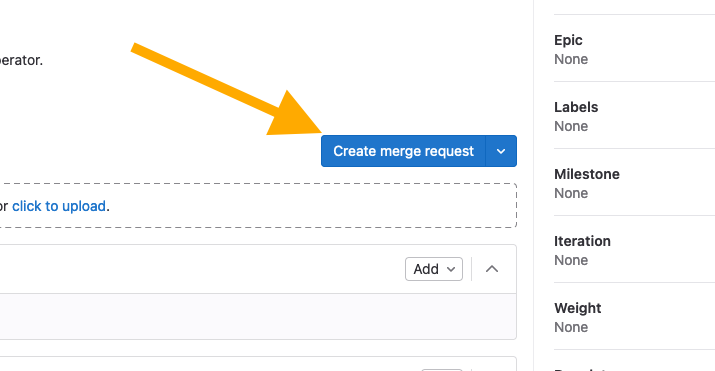
-
Checkout the branch; the branch name is at the top of the MR
- Navigate to the
deploy/folder -
Run a Find and Replace on the contents of the folder:
-
use the GUI to replace all instances of "generic-dev" (match whole word) with the name of your project (eg. "ltc-infrastructure")
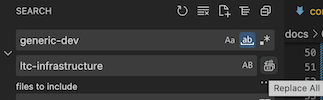
OR
- run something like:
sed -i -- 's/generic-dev/yourAppName/g' deploy/*
-
-
Commit and push the changes
- Navigate to the
CI/CD > Pipelinespage to monitor the pipeline progress
The pipeline will build an image and attempt to deploy your app to the review cluster.
If your pipeline fails...
You may need to make small changes to your deployment package review overlay for the pipeline to complete successfully. Consider the following:
- is
nginxan appropriate base? - does your deployment require additional configuration (via a ConfigMap resource)?
- does the base Service resource port need adjustment? If yes, don't change the base, just add a kustomize patch to the overlay.
latest and stable overlays
After you have a working review overlay, most of the "heavy lifting" is done; the biggest difference between this overlay and the latest/stable overlays has to do with routing and security.
To deploy to latest (or stable), make a commit to the main branch (with a semantic version keyword).