CI/CD Pipelines
A CI/CD pipeline is an infrastructure service that watches source code repositories for changes and then performs actions when a new commit is pushed. The LTC's CI/CD pipelines build images and deploy them to Kubernetes clusters.
CI/CD Pipeline
CI/CD stands for continuous integration/continuous deployment, and it refers to an integration between the code base and the deployment environment.
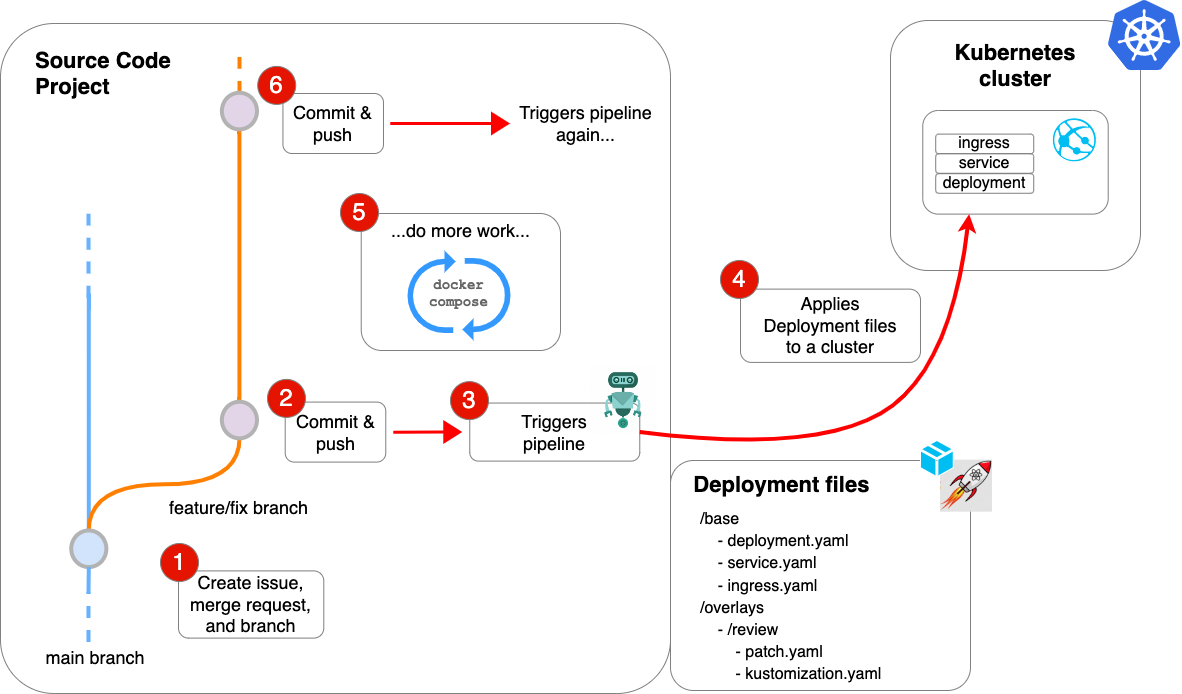
A CI/CD pipeline is a set of jobs that are configured to run automatically every time a new commit is pushed to a repository. These jobs can do many things, including testing code, building images, and pushing a deployment to a cluster. Examples of popular CI/CD pipeline tools are Drone, CircleCI, and TravisCI.
GitLab comes with a built-in CI/CD sub-system; it relies on a runner and a .gitlab-ci.yml configuration file.
A commit to a repo configured with a .gitlab-ci.yml file triggers a pipeline that builds the app and then deploys it to a cluster.
Requirements
Dockerfilethat builds successfullydeploy/folder with Kubernetes configuration manifests.gitlab-ci.ymlfile
The default GitLab ci/cd pipeline file can be added to any project with a Dockerfile to get started.
Stages
The default LTC pipeline has the following stages:
- project init
- gather info
- build
- deploy
Pushing a commit triggers the pipeline to run through each of these stages.
Working with a CI/CD Pipeline
- Create an Issue
-
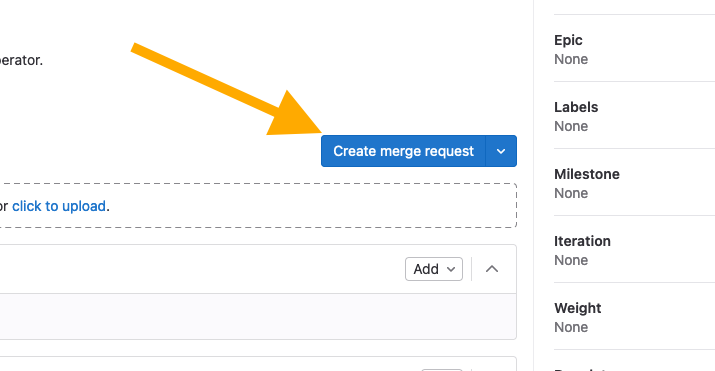
Create a Merge Request and a new branch for development
-
Open a code editor and checkout the new branch
- Develop locally using
docker run...,docker compose up, and/orskaffold dev - Commit and push changes to the remote
Project init
Project init checks to see if the project has any project access tokens; if it finds that any of these are missing, it creates them.
Gather info
This stage analyzes the repository for git tags. It determines if there are any existing tags and whether any tags should be created. Tag analysis and creation is automatically handled using semantic-release.
Semantic-Release
We use Semantic Versioning to determine whether a commit should be tagged. semantic-release analyzes commit messages and increments versions based on the type of keyword included in a commit message.
See semantic versioning for details.
Build
This stage builds an image using the in-cluster container builder, Kaniko. The image is then pushed to the project's container registry.
Deploy
This is the stage where the deployment package is updated with the lastest build information (image tag) and applied to the cluster.
FluxCD reads the configuration files from the deploy/ folder and deploys an appropriate overlay to a Kubernetes cluster.
This stage has two outcomes depending on the commit:
Triggers a deployment to the latest cluster, and the stable cluster if a git tag is committed.
- requires overlays for
latestandstable
Triggers a deployment to a review cluster
- requires a deployment package with a
reviewoverlay