deploy/ configuration details
Under Construction
This page is still being written
A deployment configuration is built around kustomize, where a base set of configuration files are modified by overlays before being applied to a cluster.
Here's what the structure of a kustomize-based deployment package looks like:
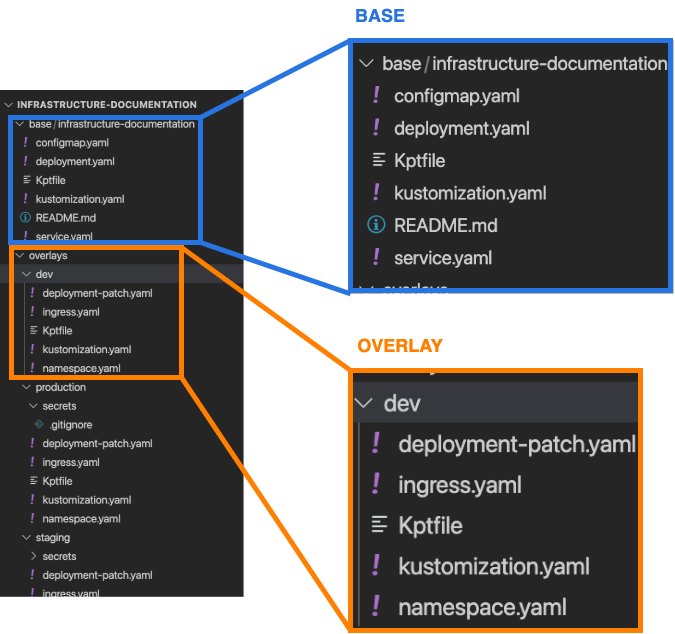
Base
The base in the example above consists of some standard KRM's:
-
configmap.yamlBecause this package is based on
nginx, it also includes aconfigmap.yamlthat containsnginx.confsettings. -
deployment.yaml -
kustomization.yamlA kustomize specification file. It describes the resources that should be applied to the cluster.
-
service.yaml
Overlays
The files in the overlay are patches that describe how a resource is changed when it is applied to a cluster.
In the example above, the dev cluster overlay adds a deployment-patch.yaml, an ingress.yaml, and a namespace.yaml to change the way the package is deployed. In a similar vein, there are files in the latest and stable overlays which make adjustments to the workloads applied to the latest and stable clusters, respectively.
First steps kustomizing the deploy/ configuration files
The generic-dev deploy/ folder contains example bases that might help give you an idea about how different workloads can be structured. The package also has example review, latest, and stable overlays that can be used as starting points for the kustomization.
- deployment.yaml
- service.yaml
- deployment.yaml
- pvc.yaml
- service.yaml
-
mongo-express
- deployment.yaml
-
service.yaml
-
deployment
- volume.yaml
- wordpress-deployment.yaml
-
mysql
- mysql-deployment.yaml
-
service.yaml
- ingress.yaml
- kustomization.yaml
- Kptfile
- serviceaccount.yaml
secrets/path